AI Inbox Manager: Stop Losing Sales in Your Email
Short Answer: An AI inbox manager can help turn your inbox from a reactive pile of messages into a structured sales system. Instead of manually scanning every email, AI can sort incoming messages by priority, identify which ones need your attention, prepare draft replies and flag leads or proposals that may have slipped through the cracks.
The biggest benefit is not simply saving a few minutes writing emails. It is reducing the mental load of constantly wondering, "What have I forgotten to reply to?"
A well-designed AI inbox manager can monitor the routine parts of email while leaving the important decisions with you. AI organises and drafts. You review, decide and send. For busy business owners, that can mean fewer missed opportunities, faster responses and much less time living inside the inbox.
Your Inbox Was Never Designed to Be a Sales System
Email is where a surprising amount of business happens. New enquiries arrive there, existing clients ask questions, prospects send follow-ups, quotes go out, meeting requests come in and suppliers need answers.
The problem is that all of those messages arrive in the same place.
A promising new lead can sit directly underneath a newsletter, an invoice notification and three emails you have been copied into for information only. Unless you have a strong process, every message asks you to make the same decision: Do I need to deal with this now?
Before long, checking email stops being a quick task and becomes a way of working. You open the inbox to answer one message, notice another problem, jump into a different task and realise 40 minutes later that you never finished what you were doing.
An AI inbox manager changes that by giving the inbox a layer of intelligence before you get involved.

What an AI Inbox Manager Actually Does
The simplest version does not need to reply to everyone or take control of your email account. Its job is to review, sort and prepare.
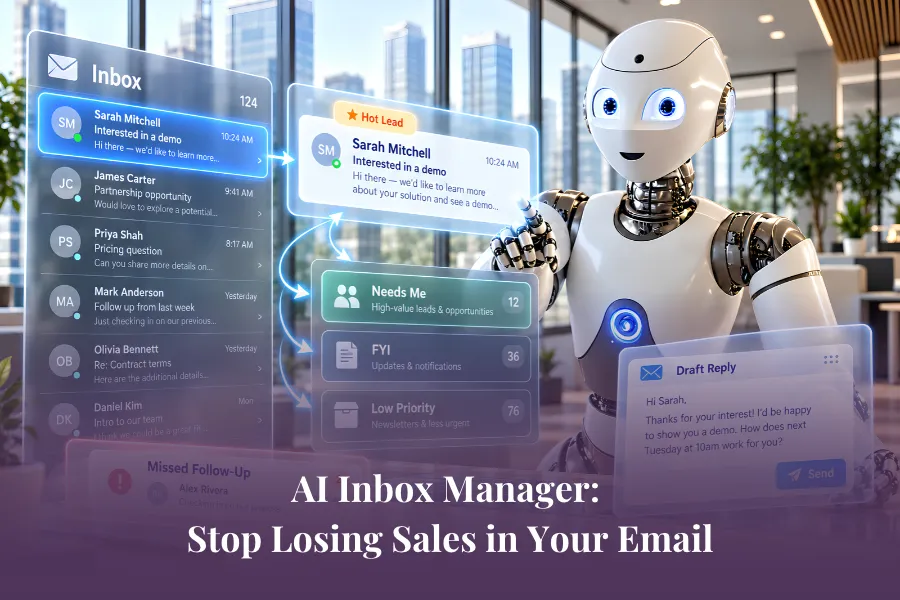
A useful setup might classify incoming messages into three groups:
Needs Me: Requires a decision, response or action from you.
FYI: Useful to know about, but no immediate response is required.
Low Priority: Newsletters, routine notifications or messages that do not need your attention now.
For messages in the first category, AI can prepare a draft response and leave it waiting for you to review. That means instead of opening your inbox and asking, "What is important?", you can begin with a much smaller list of messages that genuinely require your attention.
The real benefit is not simply a tidier inbox. It changes your role from constantly sorting information to reviewing prepared decisions.
Stop Checking Email Every Ten Minutes
One of the most useful changes you can make is surprisingly simple: stop asking AI to monitor your inbox every second. Instead, run the review on a schedule.
For example, your AI inbox manager might review messages twice a day, once early in the morning and again in the afternoon. It can sort what has arrived, identify anything that needs action and prepare relevant drafts before you open the inbox yourself.
This matters because the cost of email is not only the time spent replying. It is the interruption. Every inbox check creates an opportunity to abandon the task you were doing and start something else.
For a business owner already moving between clients, sales, marketing and operations, that constant switching adds up quickly. A scheduled AI inbox review helps turn email back into a task instead of an environment you live in.
The Sales Opportunity Hidden Inside Your Inbox
Inbox management becomes especially valuable when you look at it through a sales lens.
Imagine you sent a proposal five days ago and heard nothing back. In a traditional workflow, somebody has to remember that it exists, check whether the prospect replied, find the original conversation and decide whether it is time to follow up.
If nobody remembers, nothing happens.
An AI inbox manager can help monitor that gap. It can identify that a proposal or important sales email has not received a response, surface it when your follow-up window arrives and prepare a draft based on the previous conversation.
That is very different from simply asking AI to "write a follow-up email". The useful part is the AI noticing that the follow-up needs to happen at all.
For many small businesses, that is where opportunities disappear. Not because the business lacked leads, but because the next step relied on somebody remembering it during an already busy week.
Give AI Enough Context to Write Like Your Business
An AI inbox manager is only as useful as the context it has. If all it knows is "reply to this email", expect generic responses.
A stronger setup gives AI access to information such as:
your preferred tone and sign-off
products and services
ideal client information
common FAQs
typical sales objections
relevant case studies or testimonials
your normal response style
rules for what it should escalate
examples of good previous replies
With that foundation, AI can do more than produce grammatically correct email. It can prepare responses that are more consistent with how your business actually communicates.
The same principle applies when using AI directly while writing messages. Our guide to drafting emails with AI in your browser, in your own voice shows how giving AI the right context can make email support much more useful than simply asking for a generic reply.
Let Your Calendar Add Another Layer of Intelligence
Your inbox rarely operates in isolation. A prospect may ask whether you are free next Thursday, a client may suggest a meeting time or someone may follow up about a conversation already sitting in your calendar.
If your AI inbox manager also has appropriate access to your calendar, it can use that context when preparing responses. Instead of simply drafting "Yes, I'd be happy to meet", it could identify available times and prepare a more complete response for you to approve.
That removes another small piece of administrative work and shows why connected AI becomes more useful than isolated prompting. The email gives one piece of context, the calendar provides another, and your products, FAQs and business knowledge provide the rest.
Together, they allow AI to prepare something much closer to what a capable assistant might put in front of you.
The Goal Is Not to Auto-Send Everything
This is where businesses can go too far.
Once AI is sorting messages and writing strong replies, it is tempting to ask, "Why don't I just let it send them?"
For some low-risk, highly repeatable communication, that may eventually make sense. But client and sales emails often contain nuance that deserves human review.
A prospect may not actually be a good fit. A draft might sound too enthusiastic. A sensitive question may need a phone call instead of an email. An AI response could also contain a factual error or make a commitment you did not intend to make.
A useful default is:
AI reviews → AI drafts → human checks → human sends.
That final checkpoint keeps responsibility where it belongs while still removing most of the repetitive work. The underlying sales process should still keep a human at the final review stage before important client-facing communication goes out.
What Should Your AI Inbox Manager Be Allowed to Do?
Start with fewer permissions than you think you need.
An inbox manager does not need permission to change every system in your business on day one. Give it only what is required for the task you are testing.
For a basic setup, that might mean permission to read incoming email, categorise messages and create drafts. Calendar access could be added later if scheduling is useful.
Before connecting anything, ask:
What information can the AI see?
Which inboxes or accounts does it have access to?
Can it create drafts without sending them?
Does it need access to your calendar?
What sensitive client information could appear in email?
Which messages should always be escalated to you?
What actions require explicit approval?
More access creates more capability, but it also creates more responsibility. Start with the narrowest useful setup, test it and expand only when there is a clear reason. The source material also stresses keeping permissions as limited as practical when beginning with proactive AI.
A Simple AI Inbox Workflow to Start With
You do not need to build a sophisticated system on day one. Start with something you can easily understand and review.
Step 1: Decide your categories
Keep them simple. Needs Me, FYI and Low Priority may be enough. Think about what makes an email belong in each category so the rules are clear.
Step 2: Decide when AI should review the inbox
Pick a cadence that suits the way you work. Twice daily may be enough for one business, while another may need more frequent monitoring.
The goal is to stop checking constantly, not create another system you feel compelled to watch.
Step 3: Give AI your email context
Add your preferred style, sign-off, FAQs, products and services, objections and examples of previous replies. Make it clear which messages it should never answer without your involvement.
Step 4: Ask it to draft only what needs you
Not every email deserves a response. Let AI concentrate on messages where action is required.
Step 5: Add missed-lead monitoring
Once the basic process works, introduce rules for important sales follow-ups. For example, flag an unanswered enquiry after a certain period or surface a proposal that has gone quiet.
Step 6: Review before expanding
Track whether the system is actually reducing inbox time and missed messages. If it works consistently, then consider giving it more responsibility.
Your First AI Agent Might Already Be Sitting in Your Inbox
When people hear "AI agent", they often imagine something technically complicated that needs to run half the business. It does not have to.
An inbox manager is one of the clearest examples of a useful first agent because the task is easy to understand. Messages arrive, they need to be classified, some need responses and some need follow-up. Most of the work can also be reviewed before anything consequential happens.
This wider shift towards AI embedded directly into everyday business workflows is also explored in The AI Grapple - Ep 47: Is AI Actually Good for the Economy?. The conversation looks at why some of AI's biggest productivity gains are likely to come from reducing friction inside real work, rather than simply giving people another chatbot to use.
That makes an inbox manager a practical place to start. You can test whether AI is categorising messages correctly, preparing useful drafts and surfacing the right follow-ups before giving it more responsibility.
The benefit is also immediately visible. Instead of opening your inbox and mentally processing everything from scratch, you open a prepared workspace that says: These need you. These are just information. These can wait. These replies are ready. And this lead has gone quiet.
That is not flashy automation. It is simply a better way to work.
The Bigger Win Is Headspace
Saving five minutes on an email is useful, but that is not the most important benefit.
The bigger benefit is removing the background loop running in your head:
Did I reply to that lead? Did that client ever get back to me? Was there something I promised to send? Which email was I meant to follow up? Did I miss anything important?
A well-designed AI inbox manager reduces that mental load by creating a system that checks, organises and brings the right things back to you.
You still decide what matters. You just stop having to remember everything yourself.
For a busy business owner, that can be one of the most valuable uses of AI there is.
Ready to stop letting your inbox run your day?
You do not need to automate every email. Start with one useful job: let AI sort what matters, prepare the replies and surface the sales conversations you do not want to lose.
Once that works, you can decide how much more of the workflow you want AI to handle while keeping the final decisions with you.
Our free AI workshop shows you practical ways to identify the right tasks for AI and start building useful systems around the work you already do.
👉 Join our free AI workshop here.
Frequently Asked Questions
What is an AI inbox manager?
An AI inbox manager is an AI-supported workflow that reviews incoming email, categorises messages, identifies what needs attention and can prepare draft replies. More advanced setups can also flag unanswered leads, reference calendar information and help track follow-up.
Can AI automatically reply to my emails?
AI can draft email responses and some systems can send them automatically, but keeping human review before client-facing or sales emails are sent is a sensible starting point. This allows you to check accuracy, tone, commitments and whether the response is appropriate.
Can an AI inbox manager help with sales leads?
Yes. It can help identify new enquiries, prioritise sales-related messages, prepare replies and flag proposals or conversations that have not received a response. This can reduce the chance of a lead being forgotten simply because the inbox became busy.
How often should an AI inbox manager check email?
There is no single correct cadence. Some businesses may benefit from two scheduled reviews per day, while others may need more frequent monitoring. The goal is to create a rhythm that supports responsiveness without returning you to constant inbox checking.
What information should I give an AI email assistant?
Useful context can include your tone of voice, sign-off, products and services, ideal client information, FAQs, objections and examples of good past emails. Only provide access to the information necessary for the task, and review permissions carefully when connecting email, calendars or other business systems.
Is an AI inbox manager a good first AI agent?
It can be. Inbox triage is repetitive, follows clear rules and is easy to review before anything is sent, which makes it a practical starting point for businesses comfortable connecting their email to an AI system. Start with categorisation and drafting, test the results and expand gradually.