

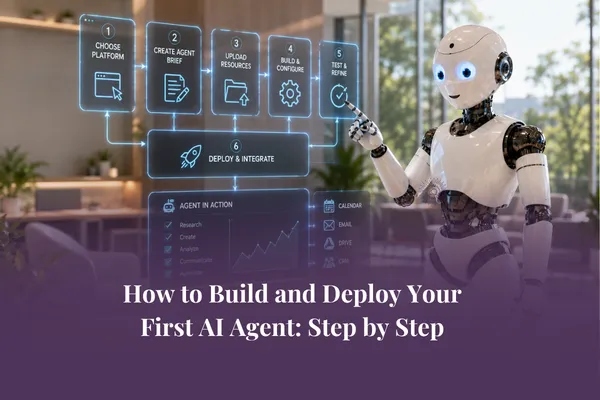
Your First AI Agent: A Step-by-Step Guide to Building and Deploying One in Your Business
Short Answer: Deploying your first AI agent doesn't require technical skills or a big budget. It requires a clear goal, solid context, and the patience to start small and refine as you go. This guide walks through every step - from choosing your platform to running your first real-world test - using the DELEGATE framework for agent prompting.
You've Done the Groundwork. Now It's Time to Build.
If you've been following this series, you've already done the hard part.
You've identified your most agent-ready task using the T.A.S.K framework. You've built the foundation documents that teach your agent how your business thinks, communicates, and operates in your Business Intelligence Centre. You know what a great output looks like - and what a poor one looks like.
Now it's time to build.
One important note before we start. Deploying an agent is not a set-and-forget exercise. It's the beginning of a working relationship - one that improves the more deliberately you manage it. The best analogy is onboarding a new team member. You wouldn't hand someone the keys and walk away. You'd brief them, show them the systems, check in until trust was established, and only then start stepping back.

Agents work the same way.
Step 1 - Choose the Right Platform for Your Task
The platform you choose should fit the task and the tools you already use. Familiarity reduces friction when you're learning how to work with an agent for the first time.
Here's a plain-English breakdown of the most accessible options for small businesses right now:
Manus - Kate's current favourite for big, complex, multi-step tasks. Give it a meaty brief with clear deliverables and it goes off and executes - creating a to-do list of phases, working through each one, and delivering a comprehensive output. Particularly strong for project-based work like research packages, sponsorship proposals, or complete campaign builds.
ChatGPT with Custom GPT or Agent mode - Familiar interface, good for content creation, research, and client communication drafts. Custom GPTs let you save your instructions and Business Intelligence Centre documents so you don't start from scratch each session.
Claude Projects - Handles large foundation documents particularly well. Strong for tasks where tone, accuracy, and brand voice matter - long-form content, client-facing material, detailed research summaries.
If you're unsure, start with whatever platform you already use most. One well-deployed agent on a familiar platform beats five half-built agents spread across tools you're still figuring out.
Step 2 - Build Your Agent Brief Using the DELEGATE Framework
This is the most important step in the entire process. And the one most people rush.
Your agent brief is the document that tells your agent who it is, what it does, how it communicates, and where the boundaries are. The quality of what you put in here directly determines the quality of what comes out.
Kate vanderVoort teaches a prompting framework for agents called DELEGATE - designed specifically for the shift from conversational prompting to task delegation. Here's how to apply it:
Define the outcome. What does the finished product actually look like? Be specific about the vision - not "help with marketing" but "create a complete sponsorship package including pricing tiers, a go-to-market strategy, outreach email templates, a slide deck, and a shortlist of 20 potential sponsors." The more clearly you can picture the endpoint, the better the agent can work toward it.
Explain the context. This is where your Business Intelligence Centre comes in. Your brand voice, your products and services, your ideal clients, your customer journey - paste these documents directly into the brief. Think about which of your foundation documents are applicable to this task and will resource the agent to do a better job.
List the boundaries. What must you absolutely have in the final output? What do you not want? Are there topics, formats, or approaches that are off-limits? Being clear about what you don't want is just as important as being clear about what you do.
Articulate success. How will you know this task has been completed well? What are the success criteria? For a sponsorship package, success might be a clearly designed brochure you can send to leads, a go-to-market strategy you can act on, and a slide deck that's presentation-ready. Define done before the agent starts.
Guide the formatting. What output format do you expect? A Word document? A structured report? A series of emails? Be specific about how you want the deliverable presented.
Add examples and templates. If you have examples of strong outputs - past work you're proud of, email sequences that convert well, proposals that landed clients - include them. This is the training data that teaches the agent what "good" looks like in your specific context.
Evaluate and refine. Build in the expectation from the start that you'll review the output, provide feedback, and iterate. The first output is rarely perfect - and that's completely normal. What matters is that you refine deliberately rather than just accepting or rejecting wholesale.
Pack all of this into your brief upfront. You can add context midway through if you realise you've missed something - agents can adjust their trajectory in real time - but the more complete your brief is at the start, the less correction you'll need at the end.
Step 3 - Load Your Foundation Documents
With your brief ready, load your Business Intelligence Centre documents into the platform.
In ChatGPT Custom GPTs, upload files or paste content into the instructions field. In Claude Projects, add documents directly to the project knowledge base. In Manus, provide context as part of the task setup.
Once everything is loaded, do a quick check. Ask the agent to summarise what it knows about your business and your communication style. If the summary feels accurate, you're ready to run a test. If something is missing or off, correct it before you go any further.
Step 4 - Run a Test Task
Before this agent goes anywhere near a real client or live content, test it.
Give it the exact task you've briefed it for, using a real scenario - not a hypothetical one. If it's a content agent, give it an actual blog post to work from. If it's a research agent, give it a real brief you'd otherwise do manually.
Then evaluate the output honestly against your brief. Does it sound like your business? Is the format right? Is anything missing, inaccurate, or off-brand? Would you be comfortable sending this to a client as-is?
Most first outputs will need refinement. That's expected. Note what needs to change, update your brief or your foundation documents accordingly, and run the test again. Three to five rounds is typical before most agents are producing consistently usable work.
One thing to resist here: the urge to micromanage every step while the agent is running. Agents thrive when you paint a clear vision upfront and then let them execute. Only step in if you can see it's genuinely gone off track. The work you do in the brief is what allows you to step back during execution.
Step 5 - Establish Your Human Review Process
This step is non-negotiable, and it needs to be decided before you go live - not improvised each time.
Chris Nolte, founder of Kayana Remote Professionals, made a point on The AI Grapple that applies directly here: many organisations invest in AI tools and find that very little actually changes - not because the tool doesn't work, but because there's no clear process for how humans and the agent work together. The tool and the human end up operating in parallel rather than in sequence, and the result is inconsistency and things falling through the gaps.
Your human review process is what prevents that.
Before going live, decide: who reviews the output? At what point? What does approved look like before anything gets sent or published? What happens if the output needs significant changes?
Write this down - even just a few clear sentences. The point is that the process is agreed in advance.
AI drafts. Humans review. Humans publish. That sequence keeps your brand, your clients, and your reputation safe.
Step 6 - Go Live and Refine
With your agent briefed, tested, and your review process in place, you're ready.
Start narrow. Run the agent on the single task you've built it for for two to three weeks before expanding. Give yourself time to observe how it performs in a real environment - not just a test one.
Keep a simple log of anything that doesn't meet your standard. After a few weeks, review the log and update your brief accordingly. Most agents improve significantly after one round of real-world refinements.
Once performance is consistent and the review process is running smoothly, you can start to expand - either adding more tasks to the same agent or deploying a second agent for a different function.
This is how an Agent Command Centre grows: one well-deployed, well-refined agent at a time.
What You've Just Built
Take a moment to recognise what this represents.
You identified a high-value repeatable task. You built the foundation that makes consistent quality possible. You deployed an agent that can now handle that task reliably, on brand, with a human in the loop.
That's not dabbling. That's implementation. And it's the foundation everything else gets built on from here.
Ready to go deeper? Our free webinar walks through the full process of building an AI-powered business - including how to structure your agent deployments, what to measure, and how to keep building your capability with confidence.
👉 Join us for the free session here.
Frequently Asked Questions
Do I need coding skills to build an AI agent?
No. Platforms like Manus, Genspark, ChatGPT Custom GPTs, and Claude Projects are all designed for non-technical users. The skill required is strategic clarity - knowing what you want the agent to do and being able to describe it specifically enough that it can execute well.
How long does it take to build a first AI agent?
With your Business Intelligence Centre documents already in place, building and testing a basic agent typically takes two to four hours. Real-world refinement adds another few hours spread across the first week or two of use.
What task should I start with?
Start with the task that scored highest in the T.A.S.K framework assessment - the one that is most repeatable, most clearly defined, and would create compounding value if done at greater scale. Resist the temptation to start with the most exciting task rather than the most ready one.
What is the DELEGATE framework?
DELEGATE is a prompting framework for AI agents. It stands for Define the outcome, Explain the context, List the boundaries, Articulate success, Guide the formatting, Add examples and templates, and Evaluate and refine. It's designed to help business owners shift from conversational prompting to proper task delegation.
Can I add context to an agent brief after it's already started?
Yes. Unlike large language models, agents can adjust their trajectory in real time if you add context midway through a task. That said, the more complete your brief is upfront, the less correction you'll need later.
What do I do if outputs are consistently off-brand?
Go back to your brand voice document. The most common cause of off-brand outputs is a brand voice document that isn't specific enough. Add more examples of content that sounds like you - and content that doesn't. Specificity is what produces consistency.