
ChatGPT Work Explained: Get Finished Documents From AI
Short Answer: ChatGPT Work is a new mode inside ChatGPT where you delegate a whole task and receive a finished output - a document, spreadsheet, presentation or report - instead of assembling answers from a chat. It gathers context from the files and tools you connect, plans the approach, does the work, and checks in when it needs your approval. You stay in control of what it can access and what gets sent or published.
There's a moment every leader knows well. You've briefed someone on a piece of work, and a few days later a finished draft lands on your desk. Not a list of suggestions. Not raw material you still have to shape. The actual thing - ready for your review.
That's the experience the ChatGPT Work app is designed to deliver. And it's the clearest sign yet of the shift we've been talking about all year: AI is moving from answering your questions to doing your work, with you as the reviewer and decision-maker rather than the assembler.
Last week we gave you the full tour of the new ChatGPT. This week we're going deep on the piece that matters most for busy leaders and business owners: what ChatGPT Work actually does, what to hand over first, and how to use it without losing oversight of what goes out the door.
What Is The ChatGPT Work App?
ChatGPT Work is a dedicated mode inside ChatGPT, powered by the new GPT-5.6 models. Instead of a conversation, you give it an outcome.
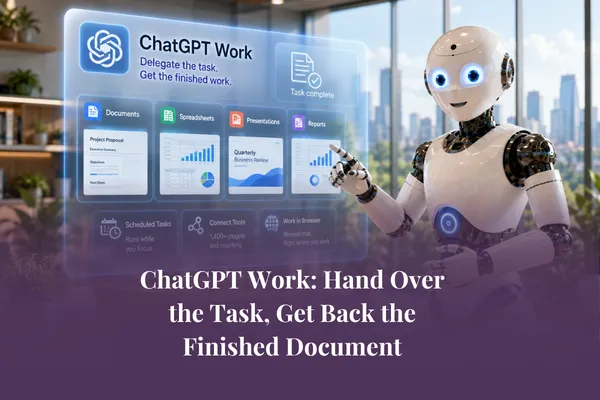
Here's the shape of it. You describe the task and what the finished output should look like. You attach or connect the source material - files, notes, a spreadsheet, an existing template. ChatGPT Work then gathers the context, makes a plan, and produces the deliverable: a polished document, a working spreadsheet, a presentation, a report or an analysis. Along the way, it checks in when a decision needs your judgement.
The difference from ordinary ChatGPT is the difference between asking a colleague "what should go in this report?" and saying "please write this report - here's the brief and the source material, and flag anything you're unsure about."

One is a conversation. The other is delegation. And delegation - not automation - is the right way to think about it. You wouldn't hand a new team member your monthly board report on day one with no brief and no review. The same rules apply here.
What It Can Produce
The honest answer is: most of the routine knowledge work that fills a working week. In practice, that looks like:
Documents - client proposals, briefing papers, meeting summaries turned into action plans, first drafts of policies and reports.
Spreadsheets - budgets built from your notes, data cleaned and analysed, a quarter's pipeline compared against last month's forecast with changes and risks summarised.
Presentations - a deck drafted from a planning document, matched to an existing template so it looks like yours.
Reports and analyses - survey feedback pulled into themes with representative quotes, or a weekly brief built from your calendar, messages and documents.
The quality of what comes back depends almost entirely on the quality of what you feed it. A vague brief with no source material produces generic work - the same as it would from a human. A clear brief, good context and a defined output produce something genuinely close to finished. This is exactly why we spent time last month on building a knowledge base your AI can draw from - that foundation just became more valuable, not less.
WorkPlugins: Connecting The Tools You Already Use
Copying information in and out of AI tools has always been the hidden tax on productivity. Plugins remove most of it.
ChatGPT Work now connects to more than 1,400 plugins covering the tools most businesses already run on - Gmail and Outlook, Google Drive and SharePoint, Slack and Teams, calendars, CRMs and project trackers. Once connected, ChatGPT can pull context directly from where the work actually lives. Ask for a weekly client update and it can draw on the email thread, the project tracker and last week's meeting notes without you assembling any of it.
Two governance points worth knowing, because we know leaders will ask:
You choose what it can see. Connections are set up deliberately, tool by tool, and workspace admins can control what's available to a team. Nothing is connected by default.
Most integrations are read-first. ChatGPT can read your inbox and draft replies, but sending still requires your confirmation. That approval step is a feature, not a limitation - keep it.
Our advice: connect the minimum set of tools that serves your first few tasks, and expand from there. Match the connection to the task, not the other way around. Focus on the task, not the tool.
Scheduled Tasks: Work That Moves While You Don't
This is the feature that quietly changes the rhythm of a week.
ChatGPT Work lets you set tasks to run once at a set time, or on a recurring schedule. The examples writing themselves in businesses right now:
A Monday morning brief - priorities, risks and follow-ups pulled from your calendar, messages and documents, waiting for you at 8am.
A weekly summary of unanswered emails, each with a drafted reply left unsent for your review.
A monthly report drafted on the 1st, ready for you to check and refine rather than start from scratch.
A watch task that monitors a project tracker and flags anything falling behind.
Notice the pattern in every one of those: the work arrives drafted, not sent. The human review step stays in the middle. AI drafts, humans review, humans publish - that's the standard we'd recommend writing into your AI policy, not just your habits.
How To Delegate Well: A Simple Briefing Structure
Whether it's a person or an AI, good delegation looks the same. Before you hand a task to ChatGPT Work, cover these four things:
The outcome - what the finished output is, who it's for, and what success looks like. "A one-page client update in our usual format" beats "summarise this project".
The source material - the files, links and connected tools it should draw from. Point it at the right context rather than hoping it guesses.
The constraints - what must not change. Tone, branding, the formulas in a spreadsheet, the order of slides, anything sensitive it should leave alone.
The checkpoint - where you want it to pause and ask rather than assume. Judgement calls, pricing, anything client-facing.
If you've been following our work on AI agents, this will feel familiar - it's the same discipline we teach for deciding which tasks are ready to delegate in the first place. The tasks that score well there are the tasks to hand to ChatGPT Work first: repeatable, well-documented, and reviewable before anything leaves the building.
Where To Start: Three Tasks This Fortnight
Don't try to redesign your operations in a week. Pick three tasks and run the experiment properly:
One document task - a recurring report or summary you currently write manually. Brief it, review it, note the gaps.
One data task - a spreadsheet analysis you usually put off. Give it the raw data and ask for the findings plus a short written summary.
One scheduled task - a weekly brief or email round-up, delivered as drafts for your review.
After two weeks you'll know three valuable things: which of your tasks are genuinely ready to delegate, what your briefs are missing, and how much of your week this could realistically hand back to you.
That last number is the one that matters. Because the point of ChatGPT Work isn't to produce more documents. It's to move you out of the assembly line and back into the work only you can do - strategy, relationships, judgement, leadership.
This is exactly what we practise together inside the AI Success Lab Elite Membership - live workshops and hands-on Prompt-a-Thons where you build these systems for your own business, with support at every step. August's deep dive covers the new ChatGPT from top to bottom.
Frequently Asked Questions
What is the difference between ChatGPT and ChatGPT Work?
ChatGPT is a conversation - you ask, it answers, and you assemble the results. ChatGPT Work is delegation - you hand over a whole task with source material and a brief, and it returns a finished document, spreadsheet, presentation or report for your review.
What can ChatGPT Work connect to?
More than 1,400 plugins are available, covering email, calendars, Google Drive, SharePoint, Slack, Microsoft Teams, CRMs and project trackers. You choose which tools to connect, and most integrations are read-first, so actions like sending an email still need your confirmation.
Are ChatGPT scheduled tasks safe to use?
Used well, yes. Set scheduled tasks to produce drafts and summaries rather than to send or publish anything automatically, and keep a human review step before outputs go anywhere. Start with internal tasks like a weekly brief before touching anything client-facing.
Do I need a paid plan to use ChatGPT Work?
ChatGPT Work launched across paid plans on web and mobile, and it's available in the desktop app on every plan. Availability is changing quickly, so check your plan's current inclusions - and decide based on the tasks you'd delegate, not the feature list.
Will ChatGPT Work replace my team?
No - and that's the wrong goal. It takes on the repeatable, well-documented tasks so your people can spend more time on judgement, relationships and the work that actually grows the business. The businesses getting results treat it as delegation with oversight, not replacement.