
Custom GPTs Replacement: Skills, Agents and Your Next Move
Short Answer: Custom GPTs are being wound down. OpenAI has introduced workspace agents as their successor for business accounts and confirmed Custom GPTs are on a deprecation path there, while skills are emerging as the new way to teach ChatGPT how you do things. Nothing disappears overnight, and nothing you've built is wasted - your instructions, knowledge files and processes all carry forward. This post shows you how to migrate calmly and come out ahead.
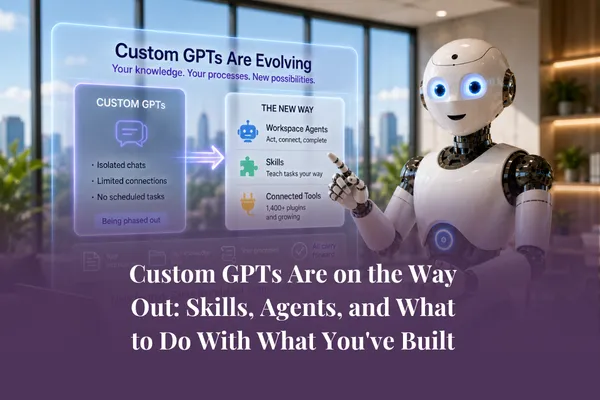
Custom GPTs Are on the Way Out: Skills, Agents, and What to Do With What You've Built
If you've spent the past year or two building Custom GPTs for your business - your brand voice GPT, your proposal writer, your customer FAQ assistant - this post is for you. And let's start with the most important sentence in it:
You have not wasted your time.
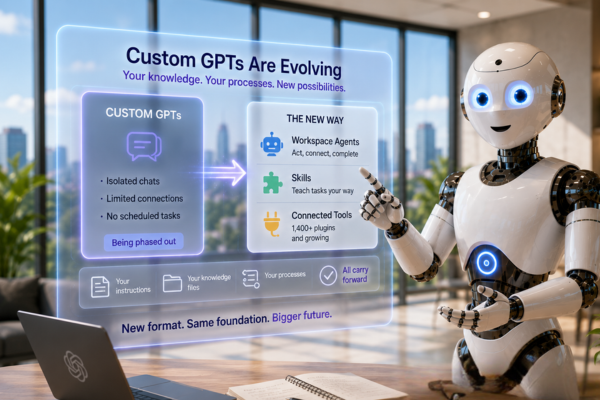
Now the news. The writing is on the wall for Custom GPTs. OpenAI announced workspace agents in April 2026 as the successor for business accounts, and confirmed that Custom GPTs are being deprecated for those account types. There's no published shut-off date, and individual users can keep using their GPTs for now - but the direction is unmistakable. New capabilities, new connectors and new models are going to agents and skills. Custom GPTs are in maintenance mode.
Cue a wave of dramatic headlines. Ignore them. This is the final post in our August series on the new ChatGPT, and we're going to do what we always do: skip the panic, look at what's actually changing, and give you a calm, practical plan. If you're just joining us, the series opener has the full picture of what's changed.
Why is this happening?
It helps to understand the why, because it makes the what-to-do obvious.
A Custom GPT is essentially a packaged chat: a set of instructions, some knowledge files, and a personality, living in its own separate window. Useful - but sealed off. Your brand voice GPT couldn't help your proposal GPT. Neither could see your connected tools, run scheduled tasks, or work in the new ChatGPT Work mode we covered earlier this series.
The new ChatGPT is built around exactly those things - agents that act, plugins that connect, tasks that run on schedules. Custom GPTs simply don't fit the shape of where the product has gone. So OpenAI is replacing the format, not the idea. The idea - teaching AI how your business does things - is more central than it's ever been.
What's replacing Custom GPTs?
Two things, and they do different jobs.
Workspace agents are the official successor for business accounts. Where a Custom GPT could only chat, an agent can act: connecting to your tools, following your processes, running on schedules and completing multi-step work. If your Custom GPT was a helpful character you talked to, an agent is a team member you delegate to. This is the delegation shift we've traced all series - and all year.
Skills are the newer idea, and in some ways the more interesting one. A skill is a way to teach ChatGPT exactly how you do a specific thing - your process for writing a proposal, your rules for formatting a report, your steps for qualifying a lead. Where a Custom GPT bundled everything into one persona, skills are modular. They load when they're needed, they can be combined when a task calls for more than one, and they work across ChatGPT rather than being locked inside one chat window.
Here's the practical difference. Old world: you open your "Proposal Writer GPT" and everything it knows lives there. New world: your proposal-writing skill, your brand voice skill and your pricing rules are separate pieces, and ChatGPT pulls in whichever ones the task needs - inside Work mode, inside a scheduled task, wherever the work is happening.
Modular beats monolithic. It's the same reason we've always taught you to build your AI foundations as separate, reusable documents rather than one giant prompt.
The migration mindset: your assets were never the GPT
Here's the reframe that takes the stress out of this entirely.
What made your Custom GPTs valuable was never the GPT format. It was what you put into them: the instructions you refined over months, the knowledge files, the examples of your voice, the process steps you documented. All of that is yours. All of it carries forward. The container is changing - the contents are the asset.
This is why we bang on about focusing on the task, not the tool. If you built your GPTs around clearly defined tasks with well-documented knowledge, migration is mostly a repackaging exercise. And it's why your business knowledge base matters more than ever - everything we covered in building the knowledge foundation your AI draws from is exactly what moves with you.
Kate and Chris Nolte dug into this on The AI Grapple - how embedding your expertise into AI systems lets your whole team work in your voice and style. That principle hasn't changed one bit; only the packaging has. Episode 46 is worth a listen if you want the deeper thinking behind it.
Your migration plan: five steps, no panic
Here's the process we recommend. Set aside an hour or two - that's genuinely all the first pass takes.
1. Audit what you've built. List every Custom GPT you have. For each one, note three things: what task it does, how often it's actually used, and who uses it. Be honest - most people find a third of their GPTs haven't been opened in months.
2. Retire the dead weight. Anything unused or superseded: let it go. Migration is a wonderful excuse for a clear-out.
3. Extract the assets. For every GPT you're keeping, copy out the instructions and download the knowledge files. Store them in your central business knowledge base - not in anyone's downloads folder. This step matters even if you change nothing else this month: it makes you format-proof.
4. Sort into skills and agents. A simple rule of thumb. If the GPT captured how you do something - a voice, a format, a process - it wants to become a skill. If it did a job that involves tools, steps or schedules - drafting replies, producing reports - it wants to become an agent. Some of your bigger GPTs will split into both, and they'll work better for it.
5. Rebuild one, test it, then move on to the next. Start with your most-used GPT. Rebuild it in the new format, run it on real work for a week, compare the results. You'll almost certainly find the new version does more than the old one - because it can now connect, schedule and act.
One extra note for the cautious (we see you, and we approve): there's no need to rush steps 4 and 5. Your GPTs still work today. Do step 3 this week so your assets are safe, then migrate at your own pace.
The bigger lesson of 2026
Step back from the detail and this series has really been about one thing.
The chat era of AI - one question, one answer - is giving way to the delegation era: models that think at different depths, work handed over whole, agents acting on screens, skills that carry your way of doing things into every corner of the tools. Custom GPTs retiring isn't an exception to that story. It's a chapter of it.
The businesses that will do well aren't the ones that guessed the right format. They're the ones that documented their tasks, built their knowledge foundations, and stayed calm each time the tools changed shape. Formats will keep changing. Your foundations don't have to.
That's been our approach through every shift so far, and it's the approach we'll keep teaching through the next one.
If you'd like to do this migration with support - and see the whole new ChatGPT in action - August's deep-dive workshop inside the Elite Membership covers models, Work, agents, skills and exactly what to do with your Custom GPTs, followed by a hands-on Prompt-a-Thon to build it for your own business.
Frequently Asked Questions
Are Custom GPTs going away?
For business accounts, yes - OpenAI has confirmed Custom GPTs are on a deprecation path, with workspace agents as the successor. There's no published shut-off date, and individual users can keep using their GPTs for now, but new capabilities are going to agents and skills. Plan your migration; don't panic about it.
What is replacing Custom GPTs?
Two things. Workspace agents replace the "assistant that does a job" side - they connect to tools, follow processes and act. Skills replace the "teach it how I do things" side - modular, reusable instructions that load when needed and combine across tasks.
What's the difference between a ChatGPT skill and a Custom GPT?
A Custom GPT bundled instructions, knowledge and personality into one sealed chat window. A skill is one modular piece - a process, a voice, a set of rules - that ChatGPT can pull in wherever the work is happening and combine with other skills when a task needs more than one.
How do I migrate a Custom GPT?
Audit what you've built, retire what's unused, extract the instructions and knowledge files into your central knowledge base, then rebuild each GPT as a skill (if it captured how you do something) or an agent (if it did a job involving tools or steps). Migrate your most-used GPT first and test it on real work.
Will I lose the work I put into my Custom GPTs?
No. The instructions, knowledge files, examples and processes you created are the real asset, and they all carry forward into skills and agents. The format is changing; your intellectual property isn't going anywhere - as long as you extract and store it properly now.